Inter Font was built for screens, so it is a natural fit for websites and web apps. This guide shows how to add Inter to a site with CSS, the professional way: self-hosted WOFF2 files, a correct @font-face, preloading, OpenType features and no layout shift. Every snippet here is copy-ready, and our type tester can generate CSS for the exact settings you choose.
Option A: Self-host (recommended)
Self-hosting means the font files live on your own server. It is fast, private (no third-party requests), and gives you every OpenType feature.
1. Get the files
Download Inter-4.1.zip from the official release. Open the web/ folder and copy these two files to your site, for example into /fonts/:
InterVariable.woff2(352 KB)InterVariable-Italic.woff2(388 KB)
Two variable files cover every weight from 100 to 900, upright and italic, plus the optical size axis.
2. Write @font-face

The font-weight: 100 900 range tells the browser this one file contains every weight. font-display: swap shows fallback text immediately and swaps in Inter when it loads, so text is never invisible.
3. Use it
:root {
  font-family: "Inter Variable", "Inter", system-ui, -apple-system, "Segoe UI", sans-serif;
  font-feature-settings: "liga" 1, "calt" 1;
}
Listing "Inter" second means visitors who installed the static font locally can still use it if the web font fails.
4. Preload the main file
Preloading starts the font download early, which helps Largest Contentful Paint:
Only preload the upright file. The italic loads on demand the first time italic text appears. Note that crossorigin is required for font preloads even on the same domain.
Get the complete Inter 4.1 family — free, no sign-up, direct download.
Option B: The official CDN or Google Fonts
The official site offers a hosted stylesheet (https://rsms.me/inter/inter.css). It is the quickest setup but adds a request to another server. Google Fonts is another option with its own build of Inter; it is convenient, but many OpenType features are removed. See Inter on Google Fonts.
| Method | Speed | Privacy | OpenType features |
|---|---|---|---|
| Self-hosted WOFF2 | Excellent | Best | All |
| rsms.me CDN | Good | Third-party request | All |
| Google Fonts | Good | Third-party request | Reduced |
Using weights and italics
With the variable font, any weight value works:
h1 { font-weight: 800; letter-spacing: -0.02em; }
.button { font-weight: 550; }
em { font-style: italic; }
Values between the named weights, like 550, are fine because the variable font interpolates. See Inter font weights for guidance.
Optical sizing and Inter Display
Inter Variable has an opsz axis from 14 to 32. Browsers set it automatically from the font size (font-optical-sizing: auto is the default), so a 48 px heading uses the Display design and 15 px body text uses the text design. To force the Display look:
.hero-title { font-variation-settings: "opsz" 32; }
OpenType features in CSS
Inter has a rich feature set. Turn features on with font-feature-settings or the higher-level font-variant-* properties:
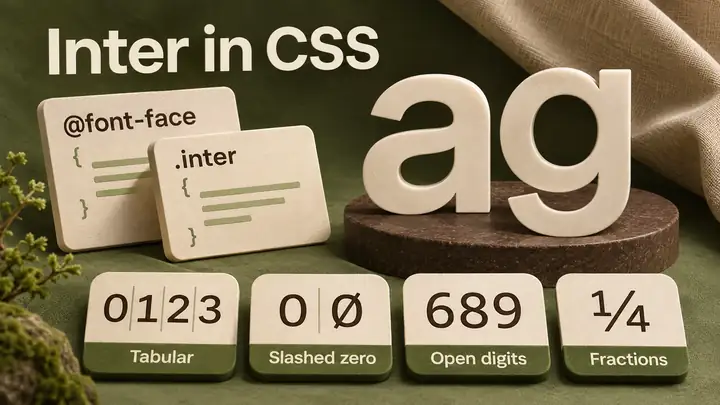
.table   { font-feature-settings: "tnum" 1; }          /* tabular numbers */
.code-id { font-feature-settings: "zero" 1; }          /* slashed zero */
.digits  { font-feature-settings: "ss01" 1; }          /* open digits */
.recipe  { font-feature-settings: "frac" 1; }          /* fractions */
.clear   { font-feature-settings: "ss02" 1; }          /* disambiguation */
Combine features in one declaration: font-feature-settings: "tnum" 1, "zero" 1;. Our OpenType features guide explains every option.
Avoid layout shift (CLS)
When the web font swaps in, text can reflow if the fallback font has different metrics. Use a metric-matched fallback:
@font-face {
  font-family: "Inter Fallback";
  src: local("Arial");
  size-adjust: 107%;
  ascent-override: 90%;
  descent-override: 22.5%;
  line-gap-override: 0%;
}
body { font-family: "Inter Variable", "Inter Fallback", sans-serif; }
These values make Arial occupy roughly the same space as Inter, so the swap is nearly invisible.
Subsetting for speed
If your site only uses English, you can subset the WOFF2 to Latin characters with a tool such as pyftsubset from fontTools, which can cut file size by more than half. Two notes: keep OpenType layout features when subsetting, and because a subset is a modified font, give it a different family name. The Inter README states that "Inter" is a Reserved Font Name, and the licence asks that modified versions use another name. This site does exactly that. See our license guide.
Frameworks
- Tailwind CSS: add
"Inter Variable"totheme.fontFamily.sansand keep your@font-facein the base layer. - Next.js:
next/font/localcan load the self-hosted WOFF2 files and generates fallback metrics for you. - npm: the community package inter-ui ships the web files for bundlers.
Checklist
- Copy
InterVariable.woff2andInterVariable-Italic.woff2fromweb/. - Add both
@font-facerules withfont-display: swap. - Preload only the upright file.
- Set a metric-matched fallback.
- Serve WOFF2 with a long cache lifetime (one year is common).
- Enable
tnumfor tables andzerowhere 0 and O must differ.
Caching and server headers
Fonts rarely change, so let browsers keep them. Inter's own help file recommends a long cache lifetime for WOFF2 files. On Apache, add this to .htaccess:
<IfModule mod_headers.c>
  <FilesMatch "\.woff2$">
    Header set Cache-Control "public, max-age=31536000, immutable"
  </FilesMatch>
</IfModule>
AddType font/woff2 .woff2
Do not let your server compress WOFF2 files again; they are already compressed with Brotli internally, so extra compression wastes CPU without saving bytes. If you upgrade Inter later, change the file name (for example InterVariable-4.1.woff2) or add a version query string so returning visitors get the new file.
Performance budget in numbers
| Asset | Size | Loaded when |
|---|---|---|
| Upright variable WOFF2 (official) | 352 KB | Every page (preloaded) |
| Italic variable WOFF2 (official) | 388 KB | Only when italic text appears |
| Latin subset, upright (this site, text optical size) | about 61 KB | Every page |
| Latin subset, italic (this site, text optical size) | about 66 KB | Only when italic text appears |
For most English-language sites, a Latin subset gives the best balance. Our own pages use one, which keeps the homepage under half a megabyte in total.
Accessibility and Inter on the web
Good typography is also accessible typography. A few CSS habits help everyone:
- Set body text in
remunits so it scales with the visitor's browser settings. - Keep
line-heightaround 1.5 to 1.7 for paragraphs. - Do not go below weight 300 for text smaller than 24 px.
- Avoid
letter-spacingon body text; Inter's default spacing is already tuned. - Check contrast; light gray Inter at weight 400 can fall below recommended contrast ratios.
Testing your setup
Open your site, then use your browser's developer tools. In the Network panel, filter by "Font" and reload: you should see one WOFF2 request (two if the page has italics), served with a font/woff2 content type and a long cache header. In the Elements panel, the computed styles of a paragraph show which font was actually used to render it. If the panel lists a fallback font, check the path in your @font-face rule.
Common mistakes
- Forgetting
crossoriginon the preload link, which makes the browser download the font twice. - Using a different family name in
@font-faceand infont-family. - Declaring
font-weight: 400instead of the range100 900, which makes bold text look faked. - Preloading the italic file on pages that never use italics.
Checking that features render
After deploying, test one feature visually. Set a paragraph to font-feature-settings: "zero" 1 and confirm the zero shows a slash. If it does not, the browser is using a fallback font or a build without the feature.
Variable font support
Every current version of Chrome, Edge, Firefox and Safari supports variable fonts and WOFF2. Very old browsers fall back to your system font stack, so the page stays readable even there.
Summary
Self-host Inter's variable WOFF2 files, declare them with @font-face, preload the upright file and add a metric-matched fallback for zero layout shift. Use font-feature-settings for tabular numbers, slashed zero and stylistic sets. Try it live in the type tester and copy the generated CSS.
Frequently asked questions
How do I add Inter Font to my website?
Copy InterVariable.woff2 and InterVariable-Italic.woff2 from the web folder of the official ZIP to your server, declare them with @font-face, and set font-family to Inter Variable.
Should I use Google Fonts or self-host Inter?
Self-hosting gives you every OpenType feature and avoids third-party requests. Google Fonts is convenient but serves a build with fewer features.
How do I enable tabular numbers in Inter?
Use font-feature-settings: "tnum" 1, or font-variant-numeric: tabular-nums.
What does font-display: swap do?
It shows text in a fallback font immediately and swaps to Inter once it loads, so text is never invisible.
Do I need separate files for each weight?
No. The variable WOFF2 contains every weight from 100 to 900. One file is needed for upright and one for italic.
Can I subset Inter for my site?
Yes, the licence allows modification, but give the subset a different family name, since the Inter README lists Inter as a Reserved Font Name.
Do I need the italic WOFF2 file?
Only if your pages use italic text. Declare it anyway; browsers download it only when italic text appears, and declaring it prevents fake italics.
How long should I cache Inter's WOFF2 files?
A year is common, as the official help file suggests. Change the file name or add a version string when you upgrade.